Page 1 of 2
Submit a "Tip for Noobs" - New PSPBrew Icon Set

Posted:
Sun Jun 04, 2006 3:27 pmby Terdinglage
Terdinglage wrote:OK, I was bored today so I thought up this idea for an custom Launch Background/Icon combo for all the homebrew in the packgen. I got the template all worked out, so it would be easy to start doing them for all the PackGen Homebrew, but heres the jist of it. Every piece of homebrew in the Pack will have the same middle bar and side tab present in this picture, and they will all have the BrewPack! Generator and
www.pspbrew.com in the lower corner. I plan to also put tips for noobs for all of them, trying to intercept any noob questions that may be asked. For all the emulators, there will be a render of the actual system in the upper right, and for the apps and other homebrew, there will be some sort of picture. The red background you see there is supposed to represent your XMB, as the custom homebrew launch background will be transparent everywhere except the middle bar and side tab. That is, unless someone is willing to provide unique backgrounds for every piece of homebrew. Tell me what you think! Should an icon scheme like this be used in the PackGen. If you vote, please explain, especially if you voted no. If you guys like it, my next post will be to gather the things we should put in the Tips for Noobs part.
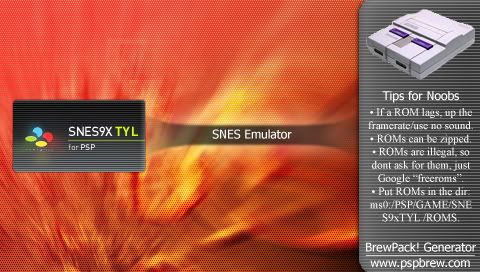
OK, if you havent seen the original post read it. Otherwise, just submit any tips you think should be in the "Tips for Noobs" part of a certain homebrew. Make sure you include the homebrew name, and if its an emulator, what systems it emulates.
Posted:
Mon Jun 05, 2006 5:50 pmby Terdinglage
seriously, you guys got nothin? I need tips for like SMS and stuff, right now I have RIN, DGEN, SNES, and Genesis. Help me out here, I dont even have a PSP to test controls on and I've contributed more than you guys

Posted:
Mon Jun 05, 2006 6:39 pmby Mailas
Nes:
[Render goes here]
Tips for Noobs:
* Be sure that when you have a really big rom that it is not zipped.
It may fill up a lot of space on your memory stick
*If you ever have a bad emulator and you want to switch, be sure that you copy your save before deleting the data.
*Put the rom in mso/PSP/GAME/NesterJ/ROMS
*If you use 2.1+ eloader you may put the roms anywhere, its reccomended they are put in a folder though.
----------------------------------
I know those tips all wont fit but use your best judgement of which ones you should use.
Posted:
Mon Jun 05, 2006 6:51 pmby Mailas
Mame (latest version):
[Render goes here]
Tips for Noobs:
*It is reccomended to put roms in a zip for MAME
*There is a total of 36 games that run perfectly on MAMEPSP
*Be sure to copy your saves on another emulator before deleting things when switching to a dif. emu.
*Put the rom in mso/PSP/GAME/NesterJ/ROMS
*If you use 2.1+ eloader you may put the roms anywhere, its reccomended they are put in a folder though.
Posted:
Mon Jun 05, 2006 11:21 pmby Jay-Jay
This might help:
Read this article:
link=
III: EMULATOR GUIDE
Posted:
Tue Jun 06, 2006 6:50 amby Mailas
Thanks for that.
Posted:
Sun Sep 10, 2006 5:22 pmby the_end_is_near
you want a tip for noobs?
DONT UPDATE!!!
Posted:
Fri Sep 15, 2006 7:38 pmby Mailas
Lol thats a good one.
Posted:
Wed Jan 10, 2007 9:50 pmby DarkPacMan77
my tip for beginners::: If you are stuck on something, talk to me and I will help you out
-DarkPacMan77-
Posted:
Sun Jan 21, 2007 1:18 pmby Mailas
Why do I get the feeling terdinglage isnt coming back.
Posted:
Sun Jan 21, 2007 1:37 pmby Supashay91
Mailas G wrote:Why do I get the feeling terdinglage isnt coming back.
because he isn't.
Posted:
Sun Jan 21, 2007 1:39 pmby Puncharger
Supashay91 wrote:
because he isn't.
So Why is he an admin again?
Posted:
Sun Jan 21, 2007 2:05 pmby Supashay91
idk, he will probably come back like he did last time and just leave.
Posted:
Sun Jan 21, 2007 2:12 pmby arto14
a tip for a noob: a psp is harmful if swallowed. jk. lol
Posted:
Sun Jan 21, 2007 2:47 pmby Supashay91
PSP does not stand for "Powerful Suppository Pill"